Terms and conditions

Tondi Shooting Range user and customer conditions

Purpose:
1.1. The purpose of these User and Client Terms and Conditions is to provide the principles of the Shooting Range User Agreement with respect to the Client using the Shooting Range services.
1.2. The user and customer conditions apply to the contract entered into upon purchase of the Visiting Card and the one-time service.

Key terms:
2.1. In the Terms of Use and Customer, the following terms are used with the following meanings:
2.1.1. "Booking Rules" - the part of the user and customer conditions that stipulates the procedure and conditions of pre-registration when purchasing the service;
2.1.2. „Lasketiir“ - service provider Tondi Lasketiir OÜ;
2.1.3. "Customer" - a person using the services of the Shooting Range on the basis of purchasing a Visiting Card or a one-time service;
2.1.4. "Visiting Card" - a multiple card of the shooting range for a regular customer;
2.1.5. "Shooting Package" - the service offered by the Shooting Range, the rights of which are defined in the Price List and provided on the Shooting Range website.
2.1.6. "User and Customer Terms and Conditions" - these User and Customer Terms and Conditions, which apply to the Customer using the services of the Shooting Range in case of purchasing a Visitor Card or a one-time service.

Use of a shooting range
3.1. The Client has the right to use the Shooting Range and the services offered therein in accordance with the conditions set out in his Shooting Package or in accordance with the conditions valid for the Visiting Card. When using the Shooting Range, the Client follows the instructions of the Shooting Range staff.
3.2. The shooting range services are provided only by persons authorized by the shooting range. The Client is prohibited from providing any services to the Shooting Range to third parties without the written consent of the Shooting Range.
3.3. The shooting range can be used by persons from the age of 16. Persons aged 12-15 (incl.) Use the Shooting Range only with an adult and / or consent (eg Shooting Packs "Junior and Senior", "Children's Birthday" or "Youth Birthday"). Persons under the age of 12 are not allowed to use the Shooting Range.
3.4. The client can access the Shooting Range on the basis of a previous reservation. The shooting range has the right to demand the presentation of an identity document to confirm a previous reservation and / or to confirm the age of the Customer.
3.5. If the Customer is not able to use the service offered by the Shooting Range at the time previously booked, he must cancel his reservation in accordance with the procedure provided in the "Booking Rules".
3.6. The Client who does not have a reservation can use the services offered by the Shooting Range only if there are free times.
3.7. The shooting range has the right to make changes in the Shooting Packages and other services offered at any time.
3.8. For extraordinary or reasons beyond the control of the Shooting Range (eg in case of an instructor's illness, bomb threat, fire, accident, their danger, etc.), the Shooting Range has the right to cancel the times previously reserved for the use of the service or restrict the use of the service. The Client will be notified as soon as possible.
3.9. The staff of the shooting range advises and instructs the Client on issues related to the use of the services provided, including the equipment, and keeps the used equipment in working order. The client uses the equipment according to its intended use and instructions received from the shooting range staff.
3.10. The Client behaves in accordance with good manners in the Shooting Range and treats the property in the Shooting Range prudently. Smoking and the consumption of alcohol or stimulants are not allowed in the shooting range. Pets are not allowed on the shooting range. The personnel of the Shooting Range have the right to temporarily remove the Shooting Range from the Shooting Range or to file a claim for damages in violation of any previous obligation or rule.

Terms of purchase and sale
4.1. The Client of the Shooting Range pays the Shooting Range for the service on the basis of an invoice according to the amount of fees provided in the price list. It is possible to pay for the service in cash or by bank card at the shooting range on site. On the website of the shooting range, it is possible to pay for the time via a bank link.
4.2. In the event of a delay in the payment of any fee under the Agreement, the Shooting Range has the right to demand late payment interest of 0.15% of the amount payable per day for each day of delay in payment until full payment of the amount due.
4.3. The shooting range has the right to withdraw from the sales contract entered into via the e-store and not to deliver the ordered goods or provide the service in the following cases:
- the goods have run out of stock;
- the price or features of the goods have been displayed incorrectly in the e-shop due to a system error;
- if the Client does not meet the conditions established by the Shooting Range.
4.4. If it is not possible for the Shooting Range to fulfill the order, the Shooting Range will contact the Customer and return the paid amount when the Customer has managed to make an advance payment for the goods.
4.5. The delivery partner of the shooting range is Itella Estonia OÜ (Itella SmartPost). The maximum delivery time is 8 working days. The ordered product is delivered via the parcel machine service.


Payment
5.1. The prices of the products sold in the shooting range online store are given in Euros without transport costs. VAT will not be added. Prices in the online store and sales showroom in Tallinn may differ.
5.2. Payment can be made via Swedbank, SEB Pank, LHV Bank, Luminor, Pocopay and Coop Pank Internet Bank. Also Paypal
CLOSE

Frequently Asked Questions

With which public transport are it possible to come from the center of Tallinn to the Weapons and Tactics Training Center?

Trams no. 3 and 4, stop “Tondi”
b. Buses no. 5, 18, 36, stop “Kalev”
c. Taxi – Be sure to add an approximate cost.


What is SLICE?

The SLICE payment method allows you to pay interest and service fees in three equal installments for purchases of € 75-800. You don’t pay a cent more than the actual cost of the product! You can choose the SLICE payment method in the last stage of the purchase, ie on the checkout page, if the purchase amount is between 75-800 euros. You will make the first installment only one month after the purchase and the second and third installments in the following months. Paying with SLICE is quick and easy. The purchase is confirmed in a few moments and there is no need to sign a credit agreement. The option to pay with the SLICE payment method is marked with the SLICE logo on each product!

The service is provided by Inbank AS

CLOSE
en
Estonia Drone Rules: Check the Map and Stay Below 120 Meters

Estonia Drone Rules: Check the Map and Stay Below 120 Meters

17.10.2026

If your drone weighs 250 g or more, or carries a camera, register as an operator and hold A1/A3 competency before you fly in Estonia. Keep the drone in visual line of sight and below 120 meters, and check the Estonian drone map and NOTAMs before every flight. Those four habits cover most of what the law asks of recreational pilots.


TL;DR:

  • Register once as an operator through LOIS, display the number on every drone, and upload it to remote identification when supported; renew before expiration.
  • Earn A1/A3 competency by studying the Estonian Transport Administration materials and passing LOIS’s multiple choice test; lighter drones do not require certification, but authorities recommend it.
  • C3 and C4 drones fly in A3, which requires no nearby people and 150 m separation from residential, commercial, and recreational areas.
  • Check Estonia’s drone map and current NOTAMs immediately before takeoff; obey the strictest overlapping restriction and secure written permission when required.
  • Flights beyond visual line of sight, over crowds, or above 120 m fall outside the open category and need specific category authorization, so apply early.

Tondi Shooting Range
Explore Drone Technology at Tondi
Explore Tondi Shooting Range’s training and events, including the chance to explore drone technology alongside traditional shooting.

Table of Contents

How do you register as a drone operator in Estonia?

Registration is the first step, and it is a one-time job per operator, not per drone. You register with the national aviation authority through the LOIS system, and the operator registration number must be displayed on every drone you own and uploaded to the remote identification system where it applies. Because the number comes from an EASA member state, it is recognized across the other EASA states too.

Who needs to register? In practice, you do if either of these describes your drone:

  • It weighs 250 g or more.
  • It carries a camera, even if it weighs less than 250 g.

Drones under 250 g without a camera or another sensor that can capture personal data generally fall outside the duty to register, subject to the exceptions described on the same EASA page. Many consumer drones carry a camera, so check whether your drone needs to be registered.

Once you have your number, mark it clearly on the airframe. A small label on the body or the battery bay works well, as long as someone who picks up the drone can read it without tools. Then enter the same number in the remote ID settings of your drone or controller app if your model supports it.

Renewal is where pilots slip. Check your renewal status and follow the official instructions to keep your operator registration current. For a full walkthrough of the portal screens, see our guide to registering a drone in Estonia through LOIS.

Who needs A1/A3 competency and how do you get it?

Registration covers the drone. Competency covers you. Check the official guidance on competency requirements for your drone. The A1/A3 certificate is obtained by studying the materials from the Estonian Transport Administration and passing a multiple-choice test inside the LOIS system. For lighter drones the certificate is not mandatory, but the authority highly recommends it for the situational awareness it builds.

Here is a simple path to the certificate:

  1. Create or log in to your LOIS account, the same one you use for operator registration.
  2. Download and read the Transpordiamet study materials from start to finish.
  3. Take notes on altitude limits, distances from people and the categories of airspace.
  4. Run through the practice questions until the answers feel automatic.
  5. Sit the multiple-choice test online and save the certificate once you pass.

Check the current official age requirements for open-category flights, including any supervision requirements for younger pilots.

Proof of competency should travel with you. Keep a PDF of the certificate on your phone and a printed copy in your drone bag, next to your operator registration number. If an inspector or a landowner asks, you can answer in seconds.

Pro Tip: Study the sections on geographical zones and distances twice. These are the questions people tend to miss, and they are also the rules that matter most on a real field.

Our walkthrough of the A1/A3 exam in Estonia breaks the preparation into small daily sessions if you prefer a slower pace.

What do CE classes and open-category subcategories mean for your flights?

Your drone’s label and weight decide which rules apply to you. EASA explains that drones bearing CE class labels 0 to 4 map to the open-category subcategories A1, A2 and A3, while legacy and privately built drones follow weight-based rules instead. In every open-category flight you must remain within visual line of sight and below 120 meters, and you must not carry dangerous goods or operate over crowds.

The classes translate into practice like this:

  • C0 and very light drones (A1): the lightest class fits subcategory A1, which allows flying close to people as long as you avoid flying over uninvolved bystanders.
  • C2 drones (A2): this class often maps to A2, which allows flights in more built-up surroundings, provided you keep the required safety distances from people.
  • C3 and C4 drones (A3): these operate in A3, which means remote areas, no people nearby and 150 m separation from residential, commercial and recreational areas.
  • Legacy drones: if your drone has no class label, its weight decides which subcategory you can use.

A2 deserves a closer look because it adds horizontal separation rules. A common rule of thumb is to keep a horizontal distance at least equal to your flight height, which is the 1:1 height-to-distance guideline, and to keep a minimum of 5 m from people when you use a slow flight mode. Always confirm the exact figures for your drone’s class in the manufacturer’s manual and the EASA pages before you rely on them.

Sometimes a drone’s characteristics or your plans push you out of the open category entirely. Flying beyond line of sight, over crowds or above the height limit puts you into the specific category, which we cover later in this article. For a plain-language explainer aimed at new operators, read our overview of EASA drone categories.

Where can you fly in Estonia? Geo-zones, airports and NOTAMs

Holding a certificate does not mean you can fly anywhere. Transpordiamet stresses that the open category gives hobbyists freedom but not unlimited freedom: restricted areas exist for national security, and operators should consult the Estonian geographic zones and contact area owners when permission is required.

Before every flight, run through this routine:

  • Open the map application. Use the Estonian drone map from Lennuliiklusteenindus AS together with Transpordiamet’s geo-zones page to see permanent restrictions around your launch point and your planned route.
  • Check airports and bases. Airports, military bases and some infrastructure sites require lower altitudes or written permission. Ämari air base, for example, requires Defence Forces permission, so check the applicable requirements well before planning a flight there.
  • Read the overlaps. When several restriction zones cover the same spot, follow the most restrictive requirement. A low ceiling from one zone beats a generous one from another.
  • Look up NOTAMs. Notices to Air Missions announce temporary restrictions such as events, exercises or emergency operations. Read the location, the altitude range and the validity period, and treat any overlap with your flight window as a no-go until you clarify it.
  • Find the owner. The map application lists contact details for many area owners. Send a short email with your name, operator number, date, time, height and launch location.

Temporary restrictions change quickly, so a map you checked yesterday is not enough. Make the check the last thing you do before takeoff, even if you flew in the same spot last week. Our page on drone safety in Estonia, including alerts and immediate actions explains what to do when an alert appears while you are already airborne.

Tallinn deserves special caution. The capital sits close to controlled airspace and has plenty of public buildings and crowded squares, so even a short hover over the old town can end up inside a restricted zone. Visitors who bring a drone on holiday should treat the map check as seriously as locals do.

What are the core in-flight rules and safety habits?

Rules on paper turn into safety only when you apply them in the air. The Transpordiamet guidance is clear that responsibility for safety lies with the remote pilot, and that keeping visual line of sight, or using a dedicated observer, is a fundamental requirement to prevent accidents with other aircraft or people on the ground.

Keep these habits on every flight:

  1. Stay in visual line of sight. You must see the drone with your own eyes, not only through a screen. If it drifts too far to see clearly, bring it back.
  2. Use an observer for FPV. When you fly with goggles, an unmanned aircraft observer must stand next to you and be able to talk to you immediately.
  3. Respect the ceiling. The maximum height is 120 m unless a different limit is posted or you hold an authorisation.
  4. Avoid uninvolved people. Never fly over people who are not part of your operation, and plan your route so that a failure drops the drone in an empty area.
  5. Give way and land. Manned aircraft always have priority. If a helicopter or plane appears and you are unsure, land at once.
  6. Fly sober. Alcohol and drugs have no place at the controller, and neither does fatigue.
  7. Watch for interference. EASA reminds operators to make sure radio interference does not affect the command-and-control link, so be careful near transmitters, power lines and dense wireless networks.

Emergencies also deserve a rule of their own: do not operate during emergency responses, because rescue helicopters and crews rely on clear air.

Pro Tip: Say your return-to-home height out loud before takeoff and set it above the tallest obstacle on your route. Many flyaways come from a return height set too low.

Beginners who want to feel the controls before flying a real aircraft can compare tools in our guide to the best drone simulators.

What should your pre-flight checklist look like?

A checklist keeps you honest when you are excited to fly. Follow the same order every time to make the checklist part of your routine.

  1. Confirm registration. Make sure your operator registration is active, the number is on the drone and remote ID is uploaded where required.
  2. Confirm competency. Have your A1/A3 certificate and an ID document within reach.
  3. Check the map. Open the Estonian drone map, read the NOTAMs and look for temporary area restrictions around your launch point and route.
  4. Check the weather and the aircraft. Look at wind, rain and temperature, inspect the propellers, and confirm that batteries are charged and the firmware is up to date.
  5. Plan the exit. Pick an emergency landing area, agree on hand signals and brief any observers on what to do if the drone loses signal.
  6. Walk the field. Look for people, animals, wires and trees that did not show up on the map.

The three most important checks before every flight, namely LOIS status, pilot competency and the Estonian drone map, are summarized on our page about the three checks before each flight.

Pro Tip: Keep the checklist as a note on your phone and tick it off each time. A routine you can see is harder to skip than one you only remember.
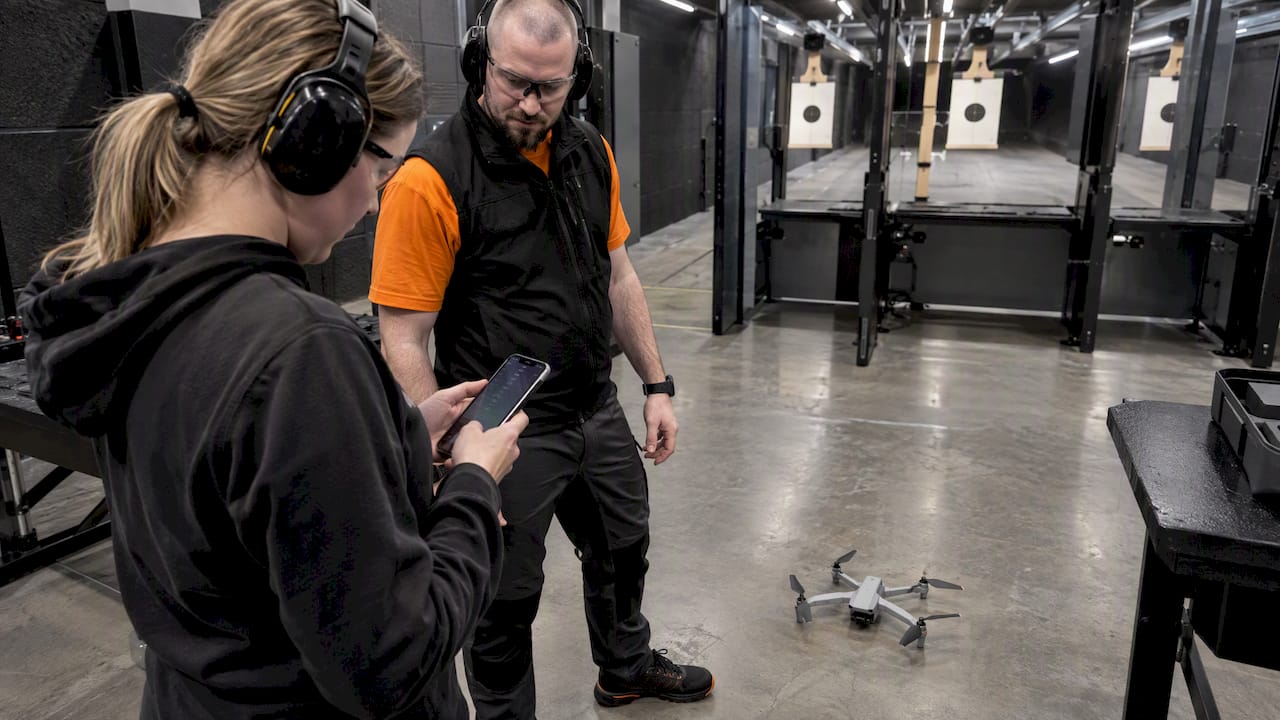
Trainee checking preflight routine beside indoor drone

When do you need a specific-category authorisation or area-owner permission?

The open category has limits, and sooner or later some projects run into them. The triggers are flights beyond visual line of sight, flights over crowds, flights above 120 m, operations with heavier drones, and any flight inside a restricted geo-zone that needs consent.

Prepare a clear package before you ask:

  • Operator and pilot details: your operator number, your name and your competency certificate.
  • Drone information: type, model and serial number.
  • Location and timing: geo-coordinates of the area, the requested altitude, and the date and time window.
  • Contingency plan: what you will do if the link drops, the battery runs low or a manned aircraft appears.

Timelines differ, and national authority authorisations vary from case to case, so apply well before your event. Contact Transpordiamet for guidance on which route fits your plan, and use the map application to find the area-owner contacts for your location.

A short, specific request gets a faster answer than a vague one. Say exactly what you want to do, how high, for how long, and what you will do to keep people safe. Owners are far more willing to say yes when they can picture the whole flight.

How do renewals, records and penalties work?

Compliance does not end when you pass the exam. Most problems appear later, when a deadline passes unnoticed.

  • Renew on time. Operator registration renewal is required, and letting it lapse can strip you of the legal right to operate.
  • Carry your papers. Keep digital or paper copies of your operator registration, your pilot competence and any authorisations whenever you fly.
  • Know the stakes. Check Transpordiamet’s current guidance on enforcement before you fly.
  • Automate reminders. Put renewal dates and any revalidation dates in your calendar with an early alert.

A simple folder on your phone with screenshots of every document saves awkward conversations in the field.

Do you need drone insurance in Estonia?

EASA’s practical do and don’t lists for the open category include ensuring you have insurance, so treat cover as part of being a responsible operator rather than an optional extra. Requirements can depend on the drone, on how you use it and on national rules, so confirm the current position with Transpordiamet before you buy a policy.

When you compare policies, look for these features:

  • Third-party liability: this covers damage or injury you cause to other people and their property, which is the most important protection for any pilot.
  • Coverage for your type of flying: a hobby policy may not cover paid work or commercial filming, and the reverse is also true.
  • Territorial scope: if you travel with your drone, check that the policy applies in Estonia and in any other country you visit.
  • Equipment cover: optional protection for the drone itself helps if you fly an expensive model near water or trees.

Read the policy exclusions line by line, including any terms about pilot competency or flying in restricted zones. Keep your policy number with your other flight documents.

How do you report a drone incident or accident?

Even careful pilots can have a bad day. EASA’s guidance says that incidents causing serious injury or affecting manned aircraft require immediate notification, so do not wait until the evening to decide what to do.

Use this order after an incident:

  1. Make it safe. Land the drone, switch it off and secure the area. Call the emergency number if anyone is hurt.
  2. Document the facts. Write down time, place, weather and what happened. Photograph the scene and the damage, and save the flight log from your app.
  3. Notify the authority. Contact Transpordiamet without delay if a person was seriously injured or a manned aircraft was involved. If you are unsure whether your case qualifies, ask rather than guess.
  4. Inform affected parties. Tell the property owner or the injured person who you are and give your contact and insurance details.
  5. Review and learn. Ask what could have prevented the event and update your checklist.

A written record made on the day is much more reliable than memory a week later, and it helps your insurer too.

What privacy rules apply when you capture images with a drone?

A drone camera sees far more than a handheld camera, and people notice. Pointing it at gardens, windows or private events can raise privacy and data protection questions even when the flight itself is perfectly legal. I cannot point you to a single rule in our sources that settles every case, so check the guidance of the Estonian Data Protection Inspectorate when your footage shows identifiable people.

These habits keep you on the safe side:

  • Avoid private spaces. Do not hover over backyards, balconies or windows, and do not follow people with the camera.
  • Tell people. When you film an event or a group, explain what you are doing and give them the chance to step out of the frame.
  • Limit what you keep. Delete footage you do not need, store the rest securely and do not publish clips that show recognizable people without their agreement.
  • Think about purpose. Filming for family memories differs from filming for business, and commercial use raises the bar for consent and documentation.

Good manners and legal caution usually point in the same direction: if neighbors would be upset to find the clip online, do not shoot it.

Learn to fly safely with us at Tondi Lasketiir

Reading the rules is one thing, and practicing them under supervision is another. We offer beginner-friendly drone training that suits first-time pilots, tourists, couples, groups of friends and corporate teams. You need no experience, every session is led by professional instructors, safety training is included, and our range is indoors, so weather never cancels your lesson.

Our sessions give you a controlled place to rehearse map checks, line-of-sight discipline and emergency procedures, which is exactly the groundwork that helps before the A1/A3 exam. Companies can start with our first drone training for businesses, listed from 85 EUR per person. Ready to book your own session? See the details on our drone safety course page and pick a date that suits you.

FAQ

Do I need to register my drone in Estonia?

Yes, if it weighs 250 g or more or carries a camera. You register once as an operator through LOIS and then display the number on every drone you own, as EASA explains.

What certificate do I need to fly a drone in Estonia?

Pilots of drones weighing 250 grams or more need the A1/A3 competency certificate. You earn it by studying the Transpordiamet materials and passing the multiple-choice test in LOIS.

How high can I fly a drone in Estonia?

Open-category flights must stay below 120 meters and within visual line of sight, according to EASA’s open category rules. A different limit can apply inside geo-zones, so check the map before you fly.

Where can I check whether I am allowed to fly at a location?

Use the Estonian drone map from Lennuliiklusteenindus AS and the geo-zones page from Transpordiamet. Also read the NOTAMs, and when zones overlap, follow the strictest one.

Sources